Benefits of Ergonomic Office Equipment for Desk Workers
Ergonomic office equipment is defined as furniture and tools designed to align your workspace with your body’s natural posture, reducing strain on muscles, joints, and soft tissue. The benefits of ergonomic office equipment are most visible in pain reduction: work-related musculoskeletal pain affects 66% of Indian IT professionals, with the lower back (55%) and neck (50%) as the most common trouble spots. That data reflects a global reality for anyone spending 8+ hours at a desk. The right setup, including an ergonomic chair, adjustable desk, split keyboard, and properly positioned monitor, can interrupt the cycle of daily discomfort before it becomes chronic injury.
1. What are the top ergonomic office equipment items for pain-prone desk workers?
The list below covers the equipment with the strongest evidence for reducing discomfort in common pain sites. Each item targets a specific biomechanical problem that prolonged desk work creates.
Ergonomic office chairs
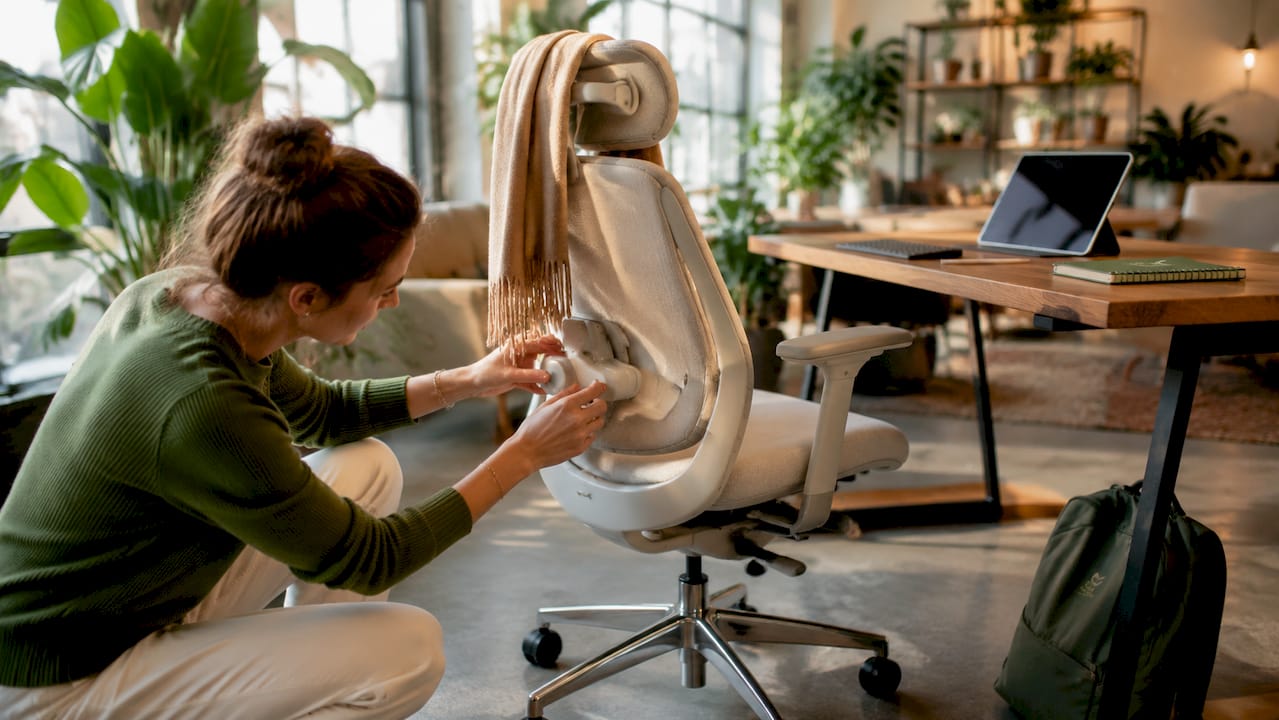
The chair is the single highest-impact piece of ergonomic equipment you can buy. Chair ergonomic risk factors more strongly predict musculoskeletal complaints than any other workstation element. A well-fitted chair with adjustable lumbar support, seat depth, and armrests keeps your spine in its natural S-curve instead of collapsing it forward. The Habitposture high back chair with lumbar support is built specifically for this purpose.
Adjustable sit-stand desks
Static sitting loads your lumbar discs continuously. Alternating between sitting and standing every 30–60 minutes reduces that cumulative load and keeps circulation moving. Sit-stand desks are the most practical way to build that habit into your workday without interrupting focus.
Ergonomic mice
Standard mice force your forearm into a pronated position, which strains the wrist and elbow over hours of use. Vertical mice and contoured designs from brands like Contour Design reposition your hand in a neutral handshake grip. That single change reduces repetitive strain on the tendons running through the carpal tunnel.
Monitor stands and risers
Your monitor should sit at eye level so your neck stays neutral. Most people place their screen too low, which pulls the head forward and loads the cervical spine. A monitor riser or adjustable arm corrects that angle without requiring a new desk.
Split and tenkeyless keyboards
Standard keyboards force your wrists inward toward the center of your body. Split ergonomic keyboards allow each hand to rest at shoulder width, reducing ulnar deviation and forearm tension. Tenkeyless models also bring the mouse closer, cutting the reach distance that strains the shoulder.
Keyboard trays
A keyboard tray positions your keyboard below desk height so your elbows sit at roughly 90 degrees and your wrists stay flat. Most desks are built too high for proper keyboard posture. A tray fixes that without replacing the desk.
Footrests
Footrests support leg circulation and keep your hips and knees at the correct angle when your chair height is set for your upper body. Without one, shorter people often sit with their feet dangling, which tilts the pelvis and increases lower back tension.
Anti-fatigue mats
Standing desks create their own problem: prolonged standing on hard floors fatigues the legs and lower back. Anti-fatigue mats compress slightly underfoot, encouraging small muscle movements that keep blood moving and reduce foot and leg soreness.
Posture correctors
A posture corrector worn during desk work provides gentle tactile feedback when your shoulders roll forward. Habitposture’s adjustable posture corrector pairs that feedback with muscle recovery support, making it a practical complement to any ergonomic chair setup.
Pro Tip: Start with the chair before buying anything else. A well-fitted chair corrects the root posture problem. Every other item builds on that foundation.
2. How does ergonomic equipment reduce musculoskeletal disorder risk?
Musculoskeletal disorders (MSDs) develop when soft tissue accumulates more load than it can recover from between work sessions. Key ergonomic risk factors include awkward postures, forceful exertions, repetitive motions, contact stress, static postures, and vibration. Office work concentrates several of these at once: prolonged sitting, sustained neck flexion, and repetitive mouse and keyboard movements.
Sustained awkward postures and workstation mismatches produce cumulative soft-tissue loading that causes back pain, neck pain, and carpal tunnel syndrome. Ergonomic equipment interrupts that loading pattern by repositioning your body into neutral alignment, where muscles and joints share force more evenly. The result is less fatigue per hour and less accumulated damage per week.
Ergonomic workstation interventions produce short-term reductions in neck and upper back pain. Combined ergonomic and postural or exercise strategies achieve better improvement than either approach alone. That finding matters because it tells you equipment is necessary but not sufficient on its own.
| Pain site | Primary ergonomic cause | Equipment solution |
|---|---|---|
| Lower back | Prolonged sitting, poor lumbar support | Ergonomic chair with lumbar adjustment |
| Neck | Monitor too low, forward head posture | Monitor riser, adjustable arm |
| Wrist and forearm | Pronated mouse grip, high keyboard | Vertical mouse, keyboard tray |
| Shoulders | Wide keyboard reach, armrest mismatch | Split keyboard, adjustable armrests |
“Ergonomic comfort aligns your workstation with natural posture to reduce strain, improve mental focus, and prevent distraction caused by discomfort.” — University of Washington Workplace Wellness
3. What complementary behaviors maximize the advantages of ergonomic furniture?
Equipment alone does not eliminate MSD risk. Ergonomic equipment is most effective when paired with movement and postural changes. The chair supports your spine, but sitting in any position for four hours straight still loads your discs and fatigues your muscles.
The behaviors below work alongside your equipment to close that gap.
- Alternate sitting and standing every 30–60 minutes. Use a sit-stand desk timer or a simple phone alarm. The transition itself, not just the standing, is what keeps your body from locking into one loading pattern.
- Take 2–10 minute movement breaks. Exercise-snack interventions of brief movement breaks during prolonged sitting alleviate musculoskeletal discomfort better than passive rest. A short walk, shoulder rolls, or a few bodyweight squats qualify.
- Reassess your setup when discomfort appears. Pain is feedback. If your neck starts aching at 2 PM every day, that is a signal your monitor height or chair depth needs adjustment, not a signal to push through.
- Combine equipment with targeted stretching. Chest openers, hip flexor stretches, and wrist rotations address the specific muscle groups that desk work shortens. Five minutes at the end of the workday compounds over weeks.
Pro Tip: Set a recurring 45-minute timer during your workday. When it goes off, stand up, move for two minutes, then sit back down. That single habit reduces cumulative spinal load more than most equipment upgrades.
4. How do different ergonomic office equipment options compare?
Choosing the right ergonomic workspace solution depends on your specific symptoms, budget, and work setup. The comparison below covers the most common decision points.
Chair types
| Chair type | Best for | Trade-off |
|---|---|---|
| High-back with lumbar support | Lower back and neck pain | Higher cost, larger footprint |
| Gaming chair with footrest | Long sessions, leg circulation | Varies widely in lumbar quality |
| Mid-back task chair | Shorter sessions, small spaces | Less neck support |
High-back chairs with adjustable lumbar support deliver the most consistent pain relief for lower back and neck complaints. The Habitposture ergonomic gaming chair with footrest adds built-in leg support for people who sit for extended periods. Mid-back task chairs work for shorter sessions but leave the upper back and neck unsupported.
Desk types
Sit-stand desks cost more upfront, but they are the only desk type that actively changes your posture throughout the day. Fixed-height desks paired with a keyboard tray and monitor riser can approximate proper ergonomics at lower cost. Compact standing desk converters sit on top of existing desks and offer a budget-friendly middle ground.
Mouse styles
- Vertical mice reduce forearm pronation and suit people with wrist or elbow pain.
- Trackball mice eliminate wrist movement entirely, shifting control to the thumb or fingers.
- Contoured mice like those from Contour Design fit the hand’s natural curve and reduce grip tension.
Budget considerations
You do not need to replace everything at once. The chair section of workstations most significantly impacts ergonomic risk scores. Prioritize the chair first, then the monitor position, then the keyboard and mouse. That sequence gives you the most pain relief per dollar spent.
Key takeaways
Ergonomic office equipment reduces musculoskeletal pain by realigning your workspace with your body’s natural posture, and it works best when combined with regular movement breaks and ongoing setup adjustments.
| Point | Details |
|---|---|
| Chair is the top priority | Chair ergonomic risk factors predict musculoskeletal complaints more strongly than any other workstation element. |
| Movement breaks are required | Brief 2–10 minute exercise snacks during sitting reduce discomfort better than passive rest alone. |
| Equipment needs ongoing tuning | Treat your setup as an iterative process and adjust whenever discomfort signals appear. |
| Target your specific pain site | Match equipment to your symptoms: lumbar support for back pain, monitor riser for neck pain, vertical mouse for wrist pain. |
| Combined strategies work best | Ergonomic interventions paired with postural and exercise strategies outperform equipment alone. |
The chair-first rule changed how I think about ergonomic setups
Most people approach ergonomic upgrades the wrong way. They buy a standing desk converter or a wrist rest and expect relief, but they are still sitting in a chair that tilts their pelvis and collapses their lumbar curve for eight hours a day. The chair is the foundation. Everything else is fine-tuning.
What the research confirms, and what I have seen play out repeatedly, is that ergonomic setup benefits from continuous assessment triggered by discomfort reports rather than a one-time purchase. People buy an ergonomic chair, feel better for a week, then drift back into old habits because nothing is prompting them to reassess. The discomfort comes back, and they blame the chair.
The fix is treating your workspace like a living system. When your neck aches, adjust the monitor. When your lower back tightens, check your lumbar support position. When your wrist flares up, try a different mouse grip. Short-term pain reduction from ergonomic interventions is well supported, but long-term relief requires sustained engagement with your setup, not a single purchase.
Start with one or two items. Get the chair right. Add a monitor riser. Then pay attention to what still hurts and work from there. That iterative approach beats spending $2,000 on a full ergonomic overhaul that you never properly adjust.
— Thomas
Habitposture gear built for real desk work
If your neck and back are telling you something needs to change, the right equipment makes that change practical rather than theoretical.
Habitposture carries ergonomic chairs with lumbar support designed for people who sit for long stretches and need real structural support, not just padding. The range also includes posture correctors that work while you work, giving your muscles the feedback they need to build better habits over time. Visit Habitposture to find the right starting point for your setup, whether that is a chair, a posture aid, or both.
FAQ
What is the most important piece of ergonomic office equipment?
The ergonomic chair delivers the greatest impact because chair-related risk factors most strongly predict neck and lower back musculoskeletal complaints among desk workers. Prioritize a chair with adjustable lumbar support before any other equipment upgrade.
How quickly does ergonomic equipment reduce pain?
Ergonomic workstation interventions produce short-term reductions in neck and upper back pain, with improvement often noticeable within days to weeks. Long-term relief requires sustained use and ongoing setup adjustments as your body and work habits change.
Does ergonomic equipment work without changing my habits?
Equipment reduces strain, but it cannot replace periodic movement breaks. Brief 2–10 minute exercise snacks during prolonged sitting reduce musculoskeletal discomfort better than passive rest, so movement habits are a required complement to any ergonomic setup.
What ergonomic equipment helps most with lower back pain?
An ergonomic chair with adjustable lumbar support targets lower back pain most directly. A sit-stand desk that lets you alternate posture every 30–60 minutes adds further relief by reducing the cumulative load on lumbar discs throughout the day.
Can ergonomic equipment benefit a home office setup?
The benefits of an ergonomic home setup are identical to those in a commercial office. The same risk factors apply: prolonged sitting, poor monitor height, and suboptimal keyboard position. A proper chair, monitor riser, and ergonomic mouse address those risks regardless of where you work.