Workplace Wellness Posture: Your 2026 Guide for Desk Workers
Workplace wellness posture is the intentional practice of keeping your body in a neutral alignment throughout the workday, positioning your joints and muscles to minimize strain and reduce your risk of work-related musculoskeletal disorders (WMSDs). Think of it as the foundation your body needs to function well across an eight-hour shift, not just a reminder to sit up straight. The spine has three natural curves at the neck, mid back, and lower back, and good posture preserves all three rather than flattening or exaggerating them. The 90-90-90 rule gives you a simple starting point: elbows, hips, and knees each at roughly 90-degree angles, feet flat on the floor, and forearms parallel to the desk surface. Organizations like the CDC and Harvard Health both recognize posture awareness as a core component of workplace wellness, not a cosmetic concern.
Good workplace posture, at a glance:
- Spine maintains its natural S-curve with lower back fully supported
- Head sits directly above the shoulders, not jutting forward
- Shoulders are relaxed, not rounded or pulled back tightly
- Elbows stay close to the body, bent between 90 and 120 degrees
- Feet rest flat on the floor or on a footrest, ankles in front of the knees
- Thighs and hips run parallel to the floor
- Monitor sits at eye level, roughly an arm’s length away
What postural problems do desk workers deal with most?
Most office workers develop the same handful of problems, and they tend to sneak up gradually rather than arriving all at once. Slouching is the most common, pulling the lower back out of its natural curve and loading the lumbar discs unevenly. Forward head posture follows closely: for every inch your head drifts in front of your shoulders, the effective load on your cervical spine increases. Rounded shoulders, which often pair with forward head posture, shorten the chest muscles and weaken the upper back over time.
Pelvic tilt is another frequent culprit. When you sit for hours without lumbar support, the pelvis rocks backward, flattening the lower back curve and compressing the discs. Improper chair height compounds this, either forcing your knees above your hips or leaving your feet dangling. Leaning toward a screen, a habit that develops gradually as focus deepens, adds pressure to the neck and jaw.
Common workplace posture problems at a glance:
- Slouching: lower back loses its curve, increasing lumbar disc pressure
- Forward head posture: head drifts ahead of the shoulders, straining the cervical spine
- Rounded shoulders: chest muscles tighten, upper back weakens
- Posterior pelvic tilt: pelvis rocks back, flattening the lumbar curve
- Crossed legs: alters pelvic tilt and spinal alignment, contributing to postural fatigue
- Feet on chair base: reduces circulation to the legs and disrupts spinal alignment
- Improper monitor height: forces the neck to tilt up or down for hours at a time
Fatigue and low-grade discomfort by mid-afternoon are the body’s early signals that something is off. Most people dismiss these as normal. They are not.
How poor posture damages your health over time
Sustained poor posture does more than cause back pain. Research from NCBI’s StatPearls identifies WMSDs as a direct consequence of prolonged awkward positions and repetitive tasks, covering muscles, joints, tendons, ligaments, and nerves. The damage accumulates quietly, which is exactly what makes it dangerous.
Compressed posture also restricts breathing. When the chest caves forward and the shoulders round inward, the diaphragm cannot fully expand, reducing oxygen intake and contributing to mental fog. Poor circulation follows, particularly in the legs when sitting with crossed ankles or feet elevated on a chair base. Over time, these physical effects feed into psychosocial ones: chronic discomfort raises stress levels, lowers job satisfaction, and increases the likelihood of absenteeism.
The numbers are clear. Integrated workplace health programs that address posture and ergonomics have been shown to reduce healthcare costs and minimize productivity losses linked to WMSDs, with long-term benefits including reduced absenteeism and improved work engagement.
Early discomfort, stiffness after sitting, or numbness in the hands are clinical warning signs, not minor inconveniences. Ignoring these signals allows postural problems to progress into chronic conditions that are far harder to reverse. The window for easy correction is early, and it closes faster than most people expect.
Practical techniques and ergonomic fixes that actually work
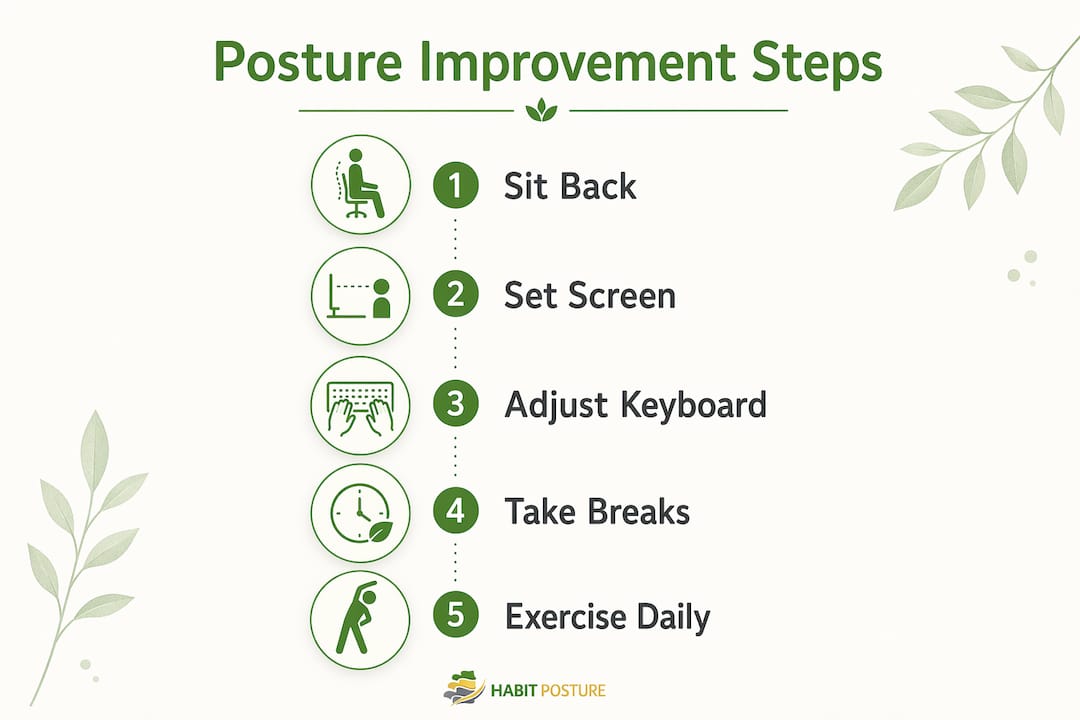
The 90-90-90 rule is your baseline. Sit all the way back in your chair so the backrest supports your lumbar curve. Set chair height so your feet rest flat and your thighs run parallel to the floor. Adjust armrests so your elbows sit just below your forearms, keeping shoulders relaxed. Then pull your equipment toward you rather than leaning forward to reach it.

Monitor placement matters more than most people realize. The top of your screen should sit at or just below eye level, at a comfortable viewing distance approximately an arm’s length from your face. Leaning toward your monitor places direct pressure on the neck and frequently causes headaches. A monitor arm makes fine-tuning easy without rearranging your whole desk.
Pro Tip: Adjust your workstation equipment to fit your supported posture, not the other way around. Pull your keyboard, mouse, and monitor toward you so your back stays against the chair. The moment you start reaching forward, your spine is already under strain.
Strengthening and stretching are the other half of the equation. Cleveland Clinic research supports a targeted exercise regimen built around scapula squeezes, pelvic tilts, and wall angels to correct forward-slumping posture. Consistency matters more than intensity: five minutes of focused movement twice a day outperforms a single long session once a week.
Key ergonomic and corrective actions:
- Sit fully back in your chair to engage lumbar support
- Position your monitor at arm’s length and at eye level
- Keep your keyboard and mouse close enough that your elbows stay at your sides
- Use a footrest if your feet do not reach the floor comfortably
- Take a 1–2 minute movement break every 30 minutes of continuous work
- Perform scapula squeezes, pelvic tilts, and wall angels daily
- Check your chair height and armrest position at the start of each workday
Long-term benefits of correcting your posture at work
The payoff for consistent posture correction goes well beyond a pain-free back. Proper spinal alignment allows the diaphragm to expand fully, improving breathing efficiency and oxygen delivery throughout the day. Better circulation follows naturally when joints are no longer compressed and blood flow to the legs is unobstructed. These physical gains translate directly into mental clarity and sustained energy, the kind that carries you through an afternoon without the usual 3 PM slump.
Reduced musculoskeletal pain lowers your risk of missing work. Integrated workplace health programs that address posture have been shown to decrease absenteeism and improve employee engagement over time. That is an organizational benefit, but you feel it personally as less fatigue, fewer sick days, and more capacity to focus on the work itself.
Long-term benefits of good posture at work:
- Reduced neck, shoulder, and lower back pain
- Lower risk of developing chronic WMSDs
- Improved breathing capacity and oxygen intake
- Better circulation, especially in the lower limbs
- Increased energy and mental focus throughout the day
- Decreased stress and improved mood
- Fewer sick days and lower healthcare costs over time
- Greater engagement and satisfaction with your work
Research-backed habits that make posture improvements stick
Early discomfort is a clinical warning sign, not background noise. Research published in NCBI’s StatPearls is clear: ignoring stiffness, soreness, or numbness allows musculoskeletal problems to worsen, and the longer they go unaddressed, the harder they are to reverse. Treating that 2 PM neck ache as a signal rather than a nuisance is the first behavioral shift that changes everything.
Habit formation research consistently shows that one-off actions do not produce lasting change. What works is building small, repeatable behaviors into your existing routine: a posture check every time you sit down, a scapula squeeze every time you open a new browser tab, a standing break every 30 minutes. These micro-habits accumulate into a fundamentally different relationship with your body at work. The CDC’s workplace health promotion model reinforces this, showing that individual habits paired with organizational support, like adjustable furniture and a culture that normalizes movement breaks, produce the most durable results.
Effective posture habits and wellness practices:
- Perform a posture self-check every time you return to your desk
- Set a timer or use a movement reminder app for breaks every 30 minutes
- Stretch your chest and shoulders at least twice during the workday
- Strengthen your core and upper back with a short daily routine
- Adjust your workstation setup before starting work, not after discomfort sets in
- Advocate for ergonomic resources at your workplace, including adjustable chairs and monitor arms
- Treat numbness, stiffness, or soreness as a prompt to move, not a reason to push through
Why posture is the foundation of workplace wellness
Posture is not a cosmetic issue. It is the structural basis for how your body handles every hour you spend at a desk. The European Agency for Safety and Health at Work defines a good working posture as one where joints are naturally aligned in a neutral position, reducing stress on muscles, tendons, and the skeletal system. When that alignment breaks down, every system downstream pays a price.
Physical therapists at the Hospital for Special Surgery put it plainly: posture is “almost impossible” to separate from any musculoskeletal condition, because the position you hold your body in all day is fundamental to nearly every injury and pain pattern they treat. That framing shifts posture from a personal habit into a clinical priority. For desk workers logging six to eight hours a day in a chair, maintaining proper posture is not optional wellness advice. It is preventive medicine.
Understanding posture also means recognizing that both static and dynamic posture matter. Static posture is how you hold your body while seated or standing still. Dynamic posture covers how you move, reach, and transition throughout the day. Optimizing both is what separates a genuinely healthy workday from one that just looks ergonomic on paper.
How good posture directly boosts your productivity
The connection between posture and productivity is physiological, not motivational. When your spine is compressed and your chest is caved forward, your diaphragm cannot expand properly, oxygen delivery drops, and cognitive performance follows. Discomfort and poor posture lead to distraction, fatigue, and burnout over time, according to ergonomics research from the University of Washington.

Conversely, a well-supported posture keeps your energy steadier across the day. You spend less mental bandwidth managing discomfort and more on the actual work. Physical therapist Astrid DiVincent at HSS notes that no ergonomic setup, however well designed, compensates for sitting at a desk for ten hours straight without moving. The productivity gain from posture correction is real, but it requires pairing good alignment with regular movement.
Small workstation adjustments, monitor height, chair angle, keyboard placement, prevent the gradual fatigue that compounds into burnout. Getting those details right at the start of the day is one of the highest-return investments a desk worker can make. Habitposture’s 2026 posture and productivity guide covers how these adjustments translate into measurable daily performance gains.
Daily posture exercises and stretches you should actually do
A daily posture routine does not need to be long. It needs to be consistent. Harvard Health recommends scapula squeezes as a foundational shoulder strengthener: squeeze your shoulder blades together and hold for 30 seconds. Pair that with chest stretches, arms clasped behind the back, held for 20–30 seconds, to counteract the forward pull of hours at a keyboard.
Wall angels are particularly effective for office workers because they train the muscles that keep the shoulders back and the thoracic spine extended, exactly the muscles that weaken from prolonged sitting. Stand with your back flat against a wall, arms at 90 degrees, and slowly raise and lower them while keeping contact with the wall. Pelvic tilts, done seated or lying down, restore mobility to the lumbar spine and counteract the stiffness that builds from hours in a chair.
Stanford University’s ergonomics guidelines recommend taking a 1–2 minute break for every 30 minutes of continuous work to stretch and interrupt sustained postures. That cadence is more effective than a single long stretch session at the end of the day. Building these breaks into your calendar, or using a simple timer, removes the willpower requirement entirely.
How workplace culture shapes posture habits across a team
Individual effort only goes so far. The CDC’s workplace health promotion model is explicit: lasting health behavior change requires both individual action and organizational support. When leadership endorses ergonomic resources, normalizes movement breaks, and builds posture awareness into onboarding, the whole team benefits, not just the employees who already care about wellness.
Practical organizational supports include providing adjustable chairs and sit-stand desks, scheduling walking meetings, and creating a culture where stepping away from the desk every 30 minutes is expected rather than frowned upon. Ergonomic training programs have been shown to reduce poor posturing and the frequency of WMSDs, though research from a systematic review published in the IIUM repository notes that the most effective delivery format is still being studied. The combination of workstation adjustment and education consistently outperforms either approach alone.
Managers play a specific role here. When a team lead visibly takes movement breaks and encourages others to do the same, it signals that wellness is a workplace value, not a personal indulgence. That cultural permission is often what desk workers need to act on what they already know. Ergonomic home office design, covered well in resources on ergonomics in home design, follows the same principle: the environment either supports good habits or works against them.
How screens and smartphones are reshaping posture problems
Technology use has introduced posture problems that previous generations of office workers simply did not face. “Tech neck” is the most widely recognized: the head tilts forward and down to look at a smartphone screen, adding substantial load to the cervical spine with every degree of forward tilt. For workers who check their phones dozens of times a day between computer sessions, this compounds the forward head posture already developing at the desk.
Dual-monitor setups create their own issues. When one screen is used far more than the other but both are placed symmetrically, workers spend hours with their head rotated to one side. Stanford’s ergonomics guidelines recommend aligning monitors according to time spent on each screen, with the primary monitor directly in front and the secondary offset to the side. Laptop use without a stand is one of the most common sources of neck strain in modern offices: the screen sits too low, forcing the neck to bend downward for hours.
The 20-20-20 rule addresses eye strain but also prompts a posture reset: every 20 minutes, look at something 20 feet away for 20 seconds. That brief refocus naturally lifts the head and relaxes the neck. Pairing it with a quick posture check makes it one of the most efficient micro-habits a desk worker can build.
Real-world workplace posture programs that have delivered results
Ergonomic intervention research gives a clear picture of what works in practice. A systematic review published by researchers at the International Islamic University Malaysia analyzed randomized controlled trials involving office workers who used computers for between 4 and 15 hours per day. Studies that combined workstation adjustments with an educational component showed significant reductions in musculoskeletal symptoms compared to control groups, with postural abnormalities and improper equipment positioning reduced significantly in intervention groups.
The University of Washington’s ergonomics program offers free workstation assessments for employees in both on-campus and hybrid settings, evaluating posture, positioning, and movement habits. Their approach reflects what the research supports: small, targeted adjustments to monitor height, keyboard angle, and chair setup prevent pain before it starts rather than treating it after the fact.
At the organizational level, the SafeWell Practice Guidelines developed for comprehensive worker health programs document that integrated approaches combining posture education, ergonomic environmental supports, and management commitment reduce healthcare costs and absenteeism over time. The common thread across every successful program is consistency: not a one-time ergonomic audit, but an ongoing culture where posture and movement are built into the daily rhythm of work. Habitposture’s resources on office worker posture improvement show how those principles apply even without a formal corporate wellness program.
Key Takeaways
Good workplace posture requires neutral spinal alignment, consistent movement breaks, and ergonomic workstation setup working together to prevent WMSDs and sustain productivity.
| Point | Details |
|---|---|
| Neutral alignment is the goal | Keep elbows, hips, and knees at 90-degree angles with feet flat and the spine’s natural S-curve supported. |
| Early discomfort is a warning | Stiffness and soreness are clinical signals; addressing them early prevents chronic musculoskeletal disorders. |
| Move every 30 minutes | A 1–2 minute break every 30 minutes of continuous work reduces tension and interrupts harmful sustained postures. |
| Workstation setup drives behavior | Adjust equipment to fit your supported posture; pulling your monitor and keyboard toward you eliminates forward lean. |
| Culture amplifies individual effort | Leadership endorsement and organizational supports like adjustable furniture make posture habits sustainable across a team. |